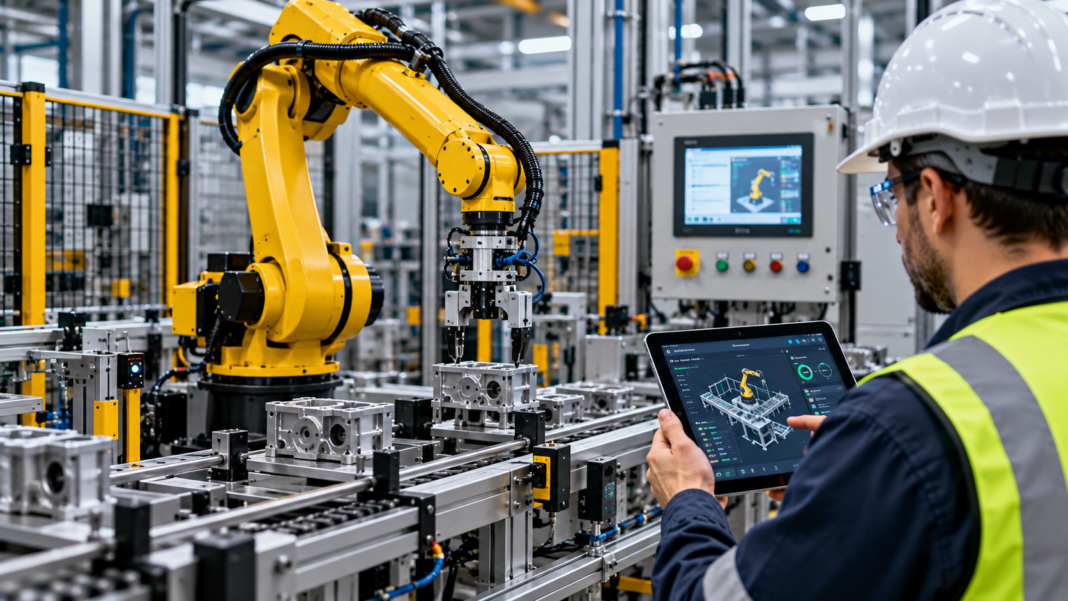
Why Industrial Robot Automation Needs More Than a Robot
Manufacturers often look at industrial robots to improve production speed, repeatability and material handling. A robot can perform tasks such as welding, assembly, packaging and machine tending, but the robot alone does not create a complete automated production system. It must work with the surrounding machines, sensors, conveyors, control panels and safety equipment. If these parts do not communicate properly, the production line may still suffer from delays, faults and inconsistent output.
Industrial robot automation involves designing and integrating these components so they work as one system. The work can include robot programming, PLC integration, machine vision, conveyor control, safety systems and production monitoring. Engineers must also account for the movement of materials, the space available on the factory floor and the way operators interact with the equipment.
For Canadian manufacturers, a successful project starts with the task that needs improvement. The team should assess the current production process, identify the main constraint and set clear performance goals before selecting equipment. This approach helps ensure that the proposed automation system fits the operation instead of adding technology that does not solve the main problem.
Which Manufacturing Tasks are Suitable for Industrial Robots?
Industrial robots are useful for tasks that require repeated movements, consistent positioning or the handling of parts in a defined work area. They can also support work in environments where repetitive manual tasks create physical strain or where a process needs consistent movement and timing.
Common applications include:
| Application | How the robot works | Key integration needs |
| Machine tending | Loads and unloads parts from machines | PLC signals, machine status and door interlocks |
| Palletising | Stacks products or packages on pallets | Conveyor control, pallet detection and load planning |
| Welding | Moves a welding tool along a programmed path | Welding equipment, fixtures and suitable safety controls |
| Assembly | Positions and joins components | Part feeding, sensors and quality checks |
| Packaging | Picks, places or groups products | Conveyor timing, product detection and packaging equipment |
| Material handling | Moves parts between workstations | Transfer equipment, position sensing and coordinated control |
| Inspection | Moves a sensor or camera to inspect a part | Machine vision, lighting and inspection software |
The right application depends on part size, product variation, cycle time, workspace and the required level of accuracy. A task that works well with a fixed robot position may need a different design when parts arrive in several sizes or orientations. Engineers should test these conditions before the system enters production.
A robot project should also account for the work that happens before and after the robotic task. If a robot can handle 40 parts per minute but the next workstation can process only 25, the line will still be limited by the slower stage. The integration plan must address the full production flow.
How Robots Connect with PLCs, Sensors and SCADA
An industrial robot cell often uses several control components. The robot controller manages the robot’s movement and programmed tasks. A programmable logic controller (PLC) coordinates signals between the robot and other machines. Sensors provide information about part presence, position and equipment status, while a human machine interface (HMI) gives operators a way to view status and use approved controls.
Supervisory control and data acquisition (SCADA) software can collect information from the wider production system. Depending on the design, it may show robot status, record faults, display production counts and store selected process data. This helps maintenance and production teams review events across several machines rather than rely only on the robot’s local display.
The connection between these systems needs clear rules. The PLC and robot controller must exchange the correct signals, such as cycle start, cycle complete, fault status and permission to enter a work area. Engineers must also define what happens if a part is missing, a conveyor stops or communication fails. The system should move to an approved state and give operators enough information to respond.
Example of a connected robotic work cell
Imagine a manufacturer that uses a robot to load metal components into a machining centre. A sensor confirms that a component has reached the loading point. The PLC checks the machine status and sends the required request to the robot controller. The robot loads the component, then returns a completion signal so the machine can begin its cycle.
The system also needs a clear response to faults. If the component is missing or the machine is not ready, the robot must not continue with the normal sequence. The HMI can display the fault, while the wider monitoring system records the event for later review. The exact control logic depends on the equipment and the approved safety design.
This example shows why robot programming and PLC integration need to be planned together. The robot must perform its task correctly, but the complete cell must also coordinate the equipment around it.
PRO TIP
Create a signal list before programming begins. Record each signal’s name, purpose, source, destination and expected state. Agree on how the system handles a missing part, a blocked conveyor, a robot fault and a loss of communication. This can prevent avoidable integration issues during commissioning.
Machine Vision and Sensors: Giving Robots Better Process Data
A robot can repeat a programmed movement, but many production tasks require information about the part in front of it. Machine vision systems use cameras and image processing software to inspect products, locate parts or check their position. Other sensors can detect presence, measure distance or confirm that a fixture has reached the required position.
In a packaging line, for example, a vision system may check the orientation of a product before a robot picks it up. If the product is out of position, the system can send a signal to the control application so the robot follows an approved response. In an inspection cell, a camera may check for a visible defect and send the result to the PLC or production system.
The performance of a vision system depends on the camera, lens, lighting, part surface and inspection criteria. Changes in product colour, reflections or the position of a component can affect the result. Engineers should test the system with actual production parts and normal variations before relying on it for quality checks.
Sensors and machine vision can also add value to production reporting. The system may record the number of parts inspected, accepted and rejected. This information can help quality teams identify patterns, provided the data is accurate and the inspection method has been validated for the task.
Planning the Robot Cell: Layout, Cycle Time and Material Flow
A robot cell should be designed around the complete task, not just the reach of the robot arm. Engineers need to review the part dimensions, tool requirements, fixture positions, conveyor height and access needed for maintenance. They should also consider how operators load materials, remove finished products and respond to faults.
Cycle time is another key factor. It includes the time needed to pick a part, move it, complete the task and return to the next position. The full production rate may also depend on machine processing time, inspection, material transfer and operator activity. A robot with a short movement cycle may not improve output if another stage remains the main constraint.
The project team should assess these points before finalising the design:
- Production demand: Define the required output and the range of products the cell must handle.
- Part handling: Confirm how parts arrive, how they are held and how finished products leave the cell.
- Robot reach and payload: Check that the robot can perform the task with the required tool and part.
- Equipment interfaces: Define the signals and communication links between the robot, PLC, machines and sensors.
- Maintenance access: Allow space for inspection, tool changes and approved service work.
- Future changes: Consider planned product changes or additional equipment that may affect the layout.
A simulation or offline programming review can help assess robot movement and identify possible collisions before installation. It does not replace site testing, but it can help the team review the design before production equipment is taken offline.
Industrial Robot Safety: Design It Into the Project
Robot safety must form part of the initial design. Industrial robots can move with speed and force, and their work areas may include moving tools, conveyors and other machines. The safety plan should identify the hazards, assess the risks and define the measures needed to protect operators, maintenance staff and other people near the cell.
Depending on the application, the design may use fixed guarding, interlocked access doors, safety rated sensors, light curtains or other protective devices. The required measures depend on the robot, tooling, workpiece, cell layout and tasks performed by people. A standard emergency stop is not a substitute for a complete risk assessment or suitable protective measures.
The control system must also distinguish between normal process signals and safety functions. Standard PLC logic and robot program commands should not replace safety rated controls where those controls are required. The engineering team must confirm the suitable safety architecture, validate the safety functions and document the results before the cell enters service.
In Canada, the project team should review the applicable provincial or territorial occupational health and safety requirements, electrical codes and relevant machinery safety standards. The Canadian Centre for Occupational Health and Safety provides useful background on industrial robot safety. The applicable requirements depend on the facility and the specific installation.
How to Select the Right Automation Solutions
The right automation solutions should fit the production task, existing equipment and long term maintenance needs. A manufacturer may need a single robot for machine tending, while another may need a connected work cell with vision inspection, conveyor control and production reporting. The project scope should follow the operational need rather than the number of features a supplier can offer.
Start by documenting the current process and the problem to be solved. Record the output target, cycle time, product range, fault history and quality requirements. Then review the available equipment, communication protocols, space constraints and safety requirements. This gives the engineering team a sound basis for comparing robot models, controllers, grippers and integration options.
The business should also assess the full cost of ownership. The initial equipment price is only one part of the project. Engineering, fixtures, guarding, electrical work, commissioning, operator training, spare parts and ongoing support can all affect the total cost. A clear proposal should identify these items and explain what is included.
Questions to ask before approving a project
| Question | Why it matters |
| What production issue will the robot solve? | Keeps the project focused on a measurable need |
| Can the existing PLCs and machines support integration? | Helps identify compatibility issues early |
| How will the system respond to faults? | Defines recovery steps and protects equipment |
| What safety measures are required? | Helps protect people and meet applicable requirements |
| How will output and quality be measured? | Provides a basis for reviewing results |
| Who will maintain the system? | Clarifies support, training and documentation needs |
A qualified automation consultant can help review these points, assess the existing installation and define the work required. The consultant should explain the technical options, identify project risks and provide clear acceptance criteria for the completed system.
Commissioning and Ongoing Industrial Automation Support
Commissioning confirms that the robot cell works as intended in its actual operating environment. The team should test robot movement, PLC signals, machine interfaces, sensors, alarms and the agreed production sequence. It should also verify the required safety functions and confirm that the system responds correctly to expected faults.
Testing should cover normal production as well as abnormal conditions. These may include a missing part, a blocked transfer point, a failed sensor or a loss of communication. The team should record the results, correct any issues and obtain the required approvals before releasing the cell for normal operation.
Operator training is also part of a sound handover. Staff need to know how to read the HMI, respond to faults, follow approved recovery steps and report recurring issues. Maintenance staff may need further training in diagnostics, backups and controlled program changes.
Industrial automation support remains important after commissioning. A support plan should cover fault diagnosis, software backups, approved updates, spare parts and access to technical help. It should also define how changes are documented and tested. These steps help keep the system maintainable as production needs change.
Measuring the Results of Robot Automation
The results should be assessed against the goals set before the project began. If the main aim was to reduce manual handling, record the tasks removed or changed and assess the effect on staff workflows. If the goal was to improve production output, compare finished units per shift, cycle time, unplanned downtime and rejected product counts.
The team should use the same measurement rules before and after installation. It should also check for unintended effects. A robot may increase the speed of one workstation but create a queue at the next stage, or raise output while increasing rejected parts. Looking at the whole production line gives a more useful picture than measuring robot movement alone.
| Measure | What to check |
| Finished output | Units completed in a defined period |
| Cycle time | Time needed to complete the full task |
| Equipment availability | Time the system is available for planned production |
| Quality | Rejected parts and reasons for rejection |
| Fault recovery | Time needed to diagnose and resolve a stop |
| Manual handling | Tasks and staff time affected by the change |
There is no single improvement figure that applies to every robot project. Results depend on the original process, the equipment, product variation and how well the system is integrated. A measured review helps the business decide if the project met its goals and what changes may be useful next.
Frequently Asked Questions
What is industrial robot automation?
Industrial robot automation uses programmable robots to perform manufacturing tasks such as welding, assembly, packaging, inspection and material handling. A complete installation may also include PLCs, sensors, conveyors, safety devices and production monitoring software. The system must be designed around the task, the equipment and the people who work near it.
How do industrial robots communicate with PLCs?
Industrial robots can exchange status signals and commands with PLCs through supported digital I/O or industrial communication protocols. The integration may cover cycle start, cycle complete, fault status, part presence and machine readiness. Engineers must confirm compatibility and define the correct response to faults before the system enters production.
Is machine vision required for every robot cell?
No. A robot working with parts in a fixed position may not need a camera system. Machine vision can be useful when parts arrive in different positions, require visual inspection or need identification before handling. The project team should assess the task and test the vision system with actual production parts.
How do manufacturers plan a safe robot installation?
The team should identify hazards, complete a risk assessment and select suitable protective measures for the robot cell. This may include guarding, interlocked access, safety rated devices and validated safety functions. The design must meet the requirements that apply to the site and the specific equipment.
Can industrial robots be added to an existing production line?
Yes, in many cases. The project team must review the existing PLCs, machine interfaces, layout, safety controls and production flow. Some installations may need new guarding, conveyor changes or controller updates. A site assessment is needed to confirm the scope and identify any limits.
What does an automation consultant do during a robot project?
An automation consultant can assess the production task, review equipment compatibility, define integration requirements and help plan the project. The work may include a system review, layout assessment, risk review and technical scope. The consultant should also help define how the completed system will be tested and measured.
Why is industrial automation support important after installation?
Industrial automation support helps maintain the robot, PLC, HMI and connected equipment after commissioning. It can include fault diagnosis, software backups, approved program updates and maintenance planning. A clear support plan helps staff respond to faults and keep the system in good working order.
Plan Your Industrial Robot Automation Project With ControlSoft Canada
Industrial robot automation can support repeatable production tasks, improve material handling and connect equipment through a coordinated control system. The results depend on sound planning, suitable integration, safe design and testing that reflects real production conditions. A clear support plan helps the system remain useful as products, equipment and operating needs change.
ControlSoft Canada provides industrial automation and integration services for businesses that need help with control systems, robot integration and production equipment. Contact the team to discuss your current process, the task you want to automate and the technical requirements of your project.
Contact ControlSoft Canada to discuss your industrial robot automation requirements.